How to Write a Resume That Beats the ATS in 2026
Up to 75% of resumes never reach a human recruiter — they're filtered out by Applicant Tracking Systems first. This guide covers the exact formatting, keywords, and structure that help your resume pass ATS screening in 2026.
An Applicant Tracking System (ATS) is software employers use to collect, sort, and rank job applications. Giants like Workday, Greenhouse, Lever, and Taleo power hiring at most mid-to-large companies — and even many startups use lighter ATS tools.
The good news: ATS systems aren't mysterious. They follow predictable rules. Write for machines first, humans second — and you'll dramatically increase your interview rate.
What is an ATS?
When you click “Apply,” your resume enters a database. Recruiters search that database by job title, skills, years of experience, and location. If your resume isn't parsed correctly — or lacks the right keywords — you won't appear in their results, even if you're qualified.
| ATS function | What it means for you |
|---|---|
| Parsing | Extracts text from your file into structured fields |
| Keyword matching | Scores your resume against the job description |
| Ranking | Higher match scores surface first to recruiters |
| Filtering | Knockout questions (years of exp, visa, location) can auto-reject |
How ATS reads your resume
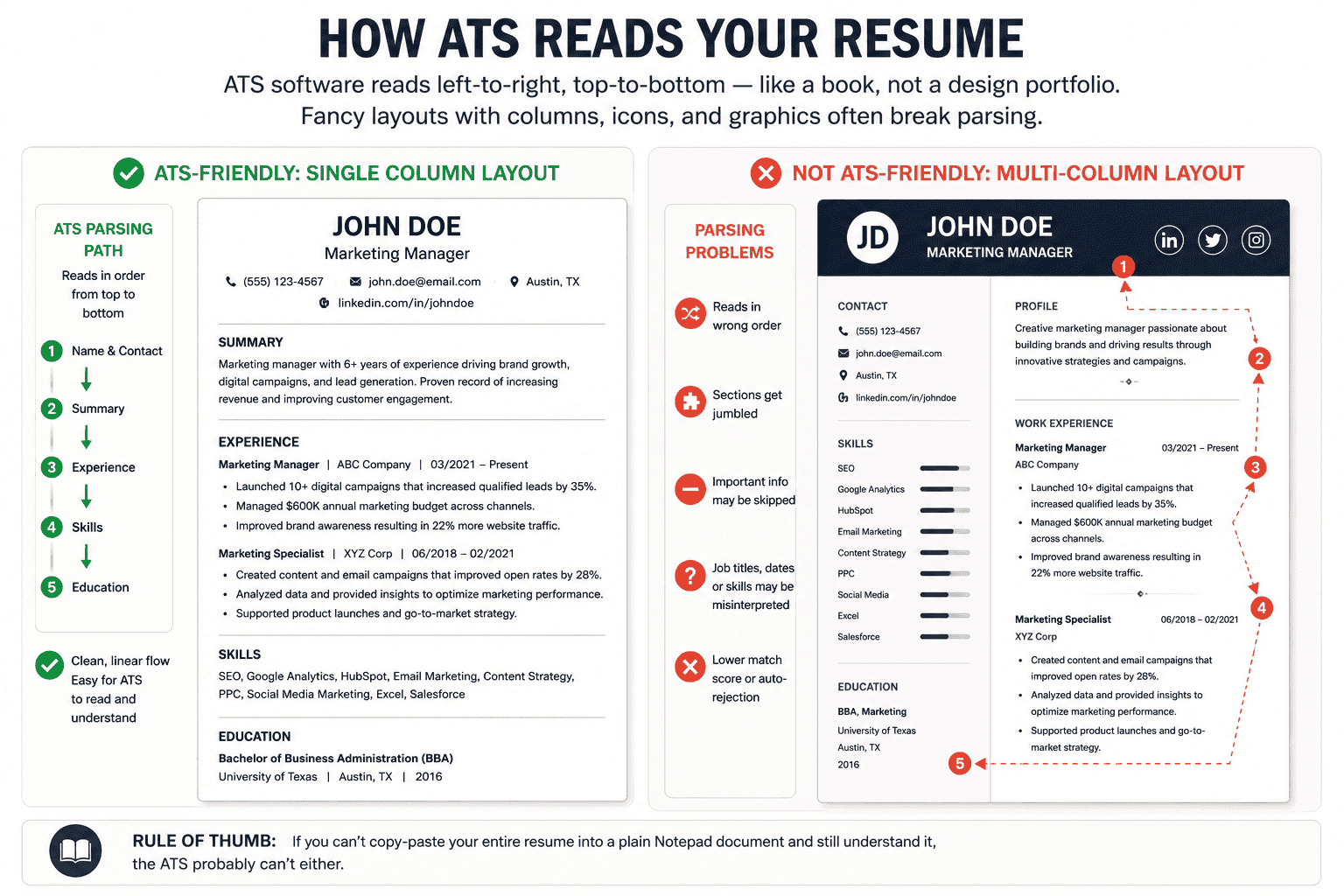
ATS software reads left-to-right, top-to-bottom — like a book, not a design portfolio. Fancy layouts with columns, icons, and graphics often break parsing. The system may jumble your job titles, merge sections, or skip content entirely.
ATS-friendly formatting rules
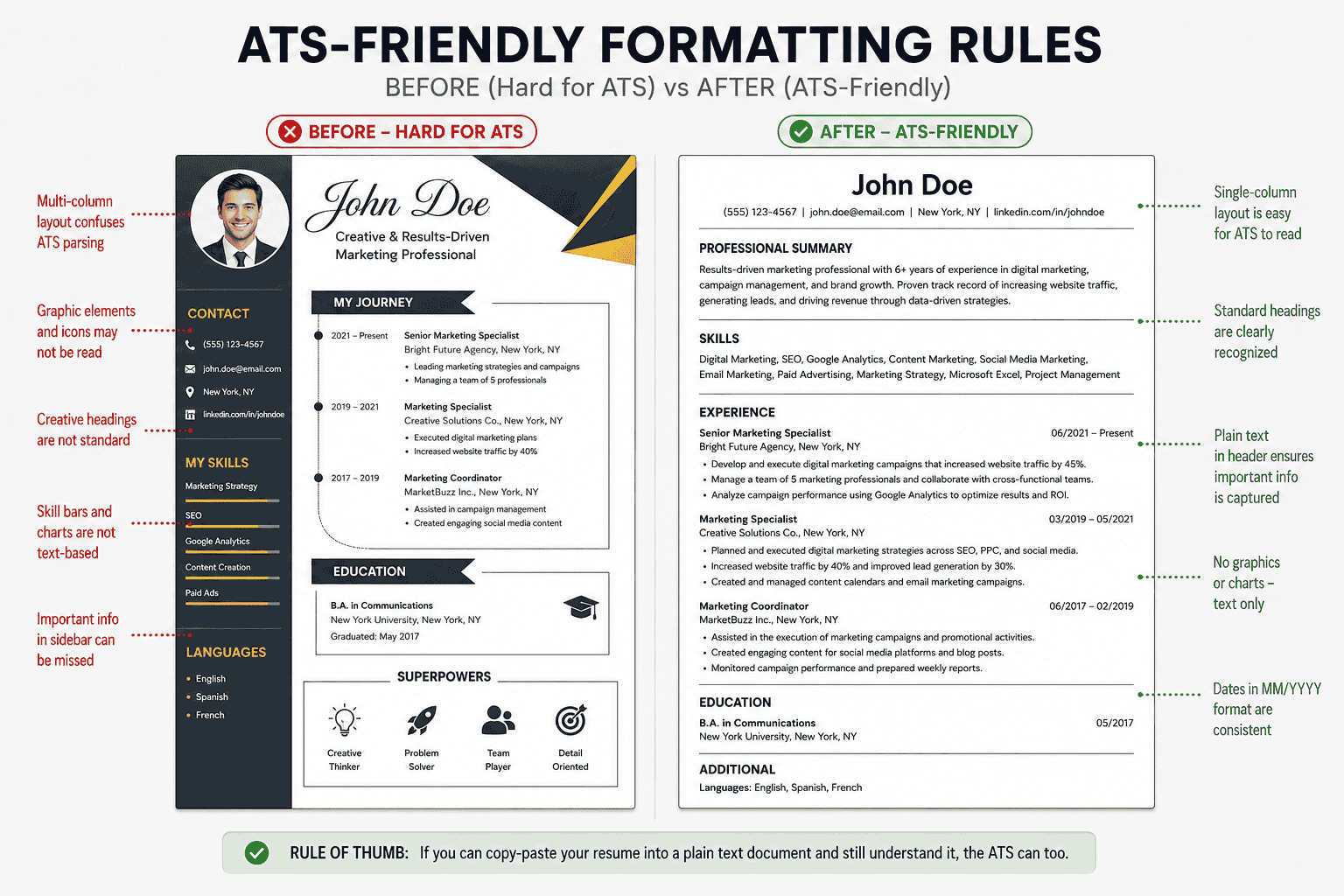
Design minimalism wins in 2026. Recruiters spend 6–7 seconds on an initial scan — but only after the ATS lets your resume through. These formatting rules keep parsing clean.
| Element | Do ✓ | Avoid ✗ |
|---|---|---|
| Layout | Single column, linear flow | Multi-column, text boxes, sidebars |
| Font | Arial, Calibri, Helvetica, Garamond (10–12 pt) | Script, decorative, or custom fonts |
| Headings | Standard labels: Experience, Education, Skills | Creative headers: “My Journey”, “Superpowers” |
| Bullets | Simple round or dash bullets | Icons, arrows, checkmarks as bullets |
| Contact info | Plain text in body header — not in footer only | Info trapped in header/footer tables |
| Graphics | None — text only | Skill bars, charts, photos, logos |
| Dates | MM/YYYY or Month YYYY (consistent) | Seasons (“Fall 2022”) or vague ranges |
Section order & structure
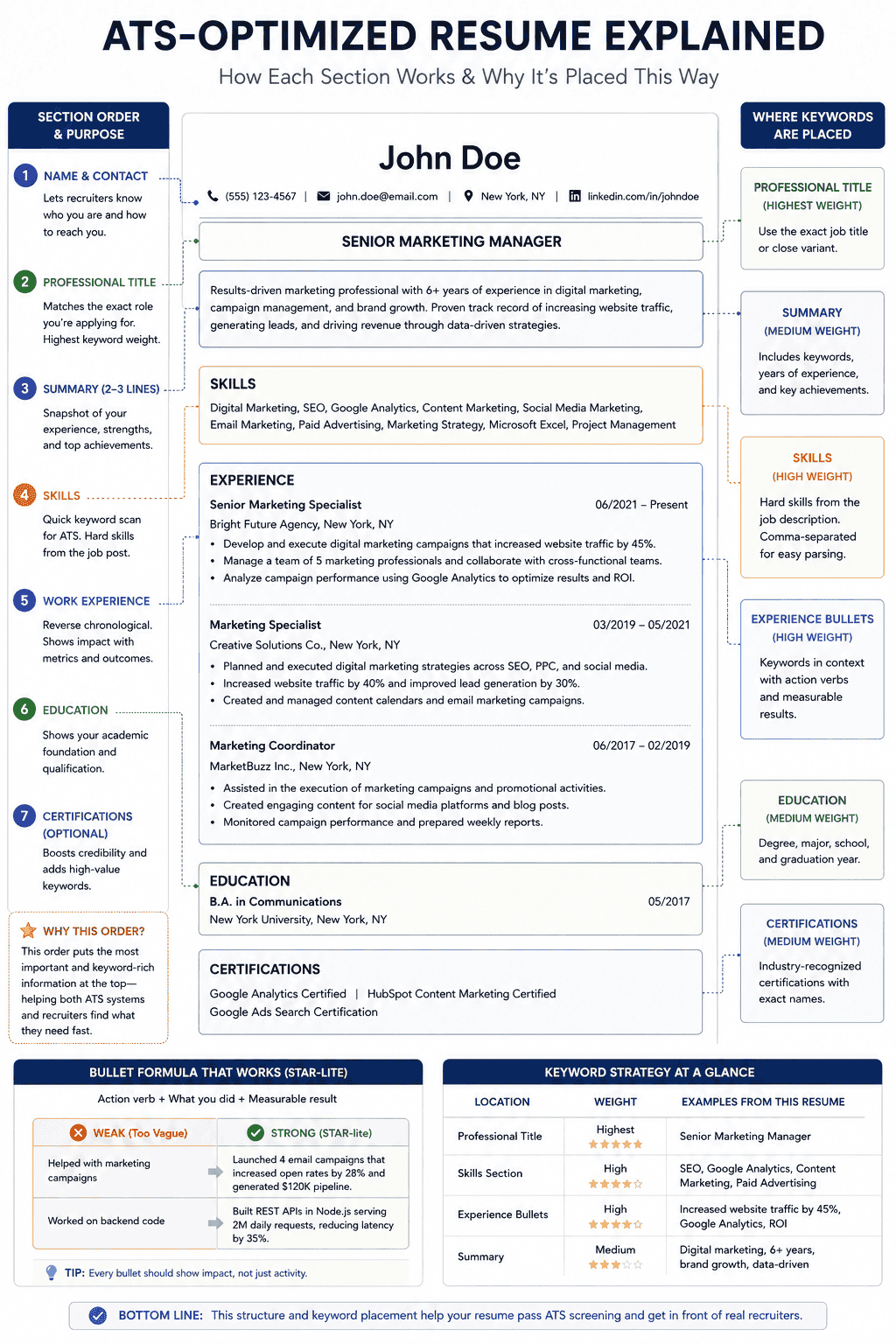
Order matters. Put the highest-signal content where both ATS and recruiters look first. For most candidates in 2026, this structure performs best:
| Order | Section | Purpose |
|---|---|---|
| 1 | Name & contact | Phone, email, LinkedIn, city/state (optional) |
| 2 | Professional title | Match the job title you're applying for |
| 3 | Summary (2–3 lines) | Keywords + years of experience + top achievement |
| 4 | Skills | Hard skills from the job description (comma-separated) |
| 5 | Work experience | Reverse chronological — most recent first |
| 6 | Education | Degree, school, graduation year |
| 7 | Certifications (optional) | AWS, PMP, Google, etc. — highly searchable |
Bullet formula that works
Use the STAR-lite pattern: Action verb + what you did + measurable result.
| Weak | Strong |
|---|---|
| Helped with marketing campaigns | Launched 4 email campaigns that increased open rates by 28% and generated $120K pipeline |
| Worked on backend code | Built REST APIs in Node.js serving 2M daily requests, reducing latency by 35% |
Keyword strategy for 2026
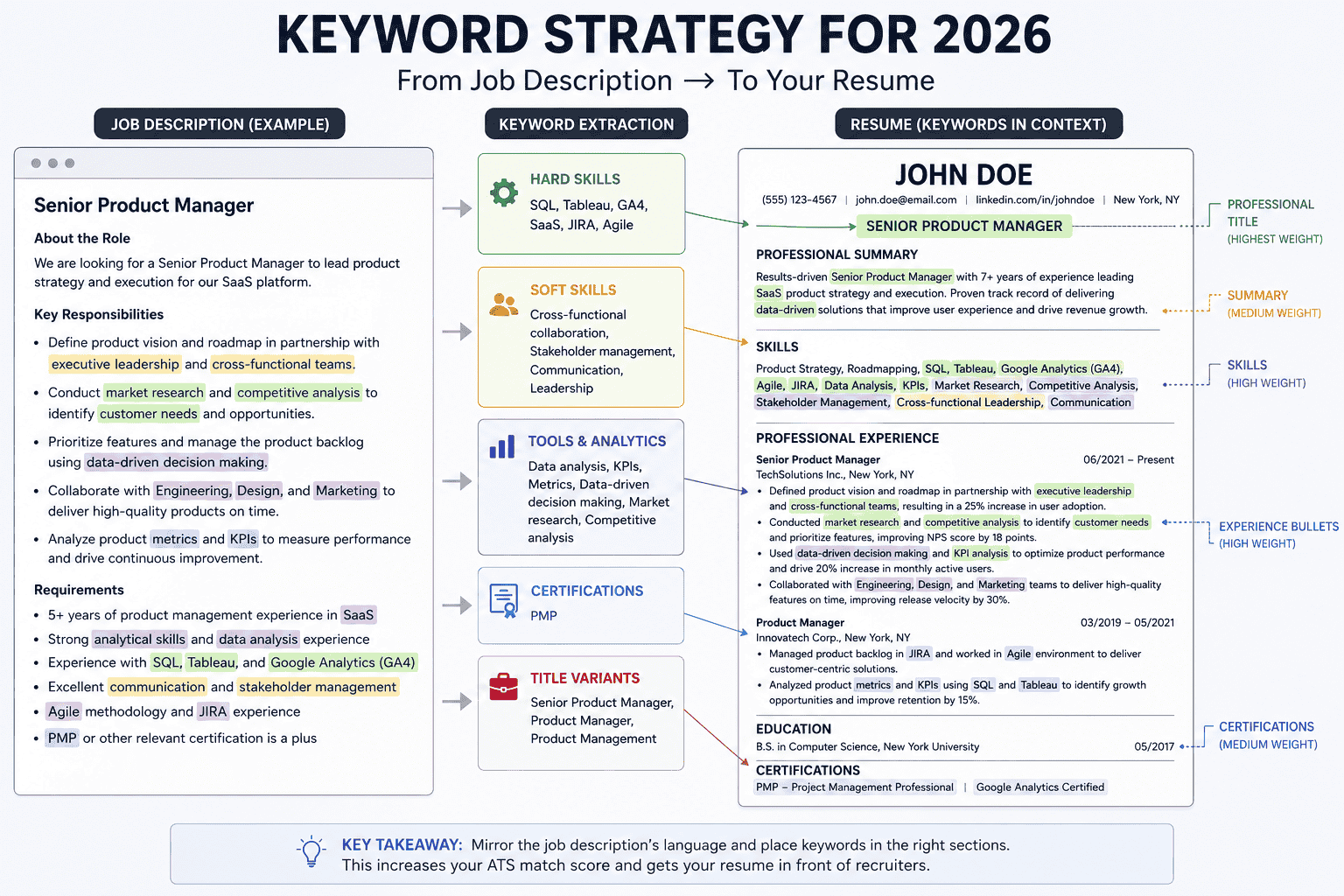
Keywords are how ATS connects you to a role. Mirror the job description's language — if they say “client relationship management,” don't only write “people skills.” Tailor every resume; a one-size-fits-all file underperforms.
Where to place keywords
| Location | Weight | Examples |
|---|---|---|
| Professional title | Highest | Senior Product Manager, Full-Stack Engineer |
| Skills section | High | Python, SQL, Figma, Agile, SEO |
| Experience bullets | High | Tools and outcomes used in context |
| Summary | Medium | Industry + role + years + specialty |
Keyword types to extract from any job post
| Type | From job description | On your resume |
|---|---|---|
| Hard skills | React, Salesforce, GA4 | Skills section + experience bullets |
| Soft skills | Cross-functional leadership | Demonstrate in bullet results, not a laundry list |
| Certifications | PMP, CPA, AWS Solutions Architect | Dedicated certifications line with exact name |
| Title variants | Software Engineer III | Match title or use industry-standard equivalent |
High-impact action verbs by role
| Role | Use these verbs |
|---|---|
| Engineering | Built, Deployed, Optimized, Automated, Architected, Migrated |
| Design | Designed, Prototyped, Researched, Iterated, Shipped, Tested |
| Marketing | Launched, Grew, Converted, Analyzed, Scaled, Positioned |
| Management | Led, Directed, Hired, Mentored, Delivered, Streamlined |
File format guide
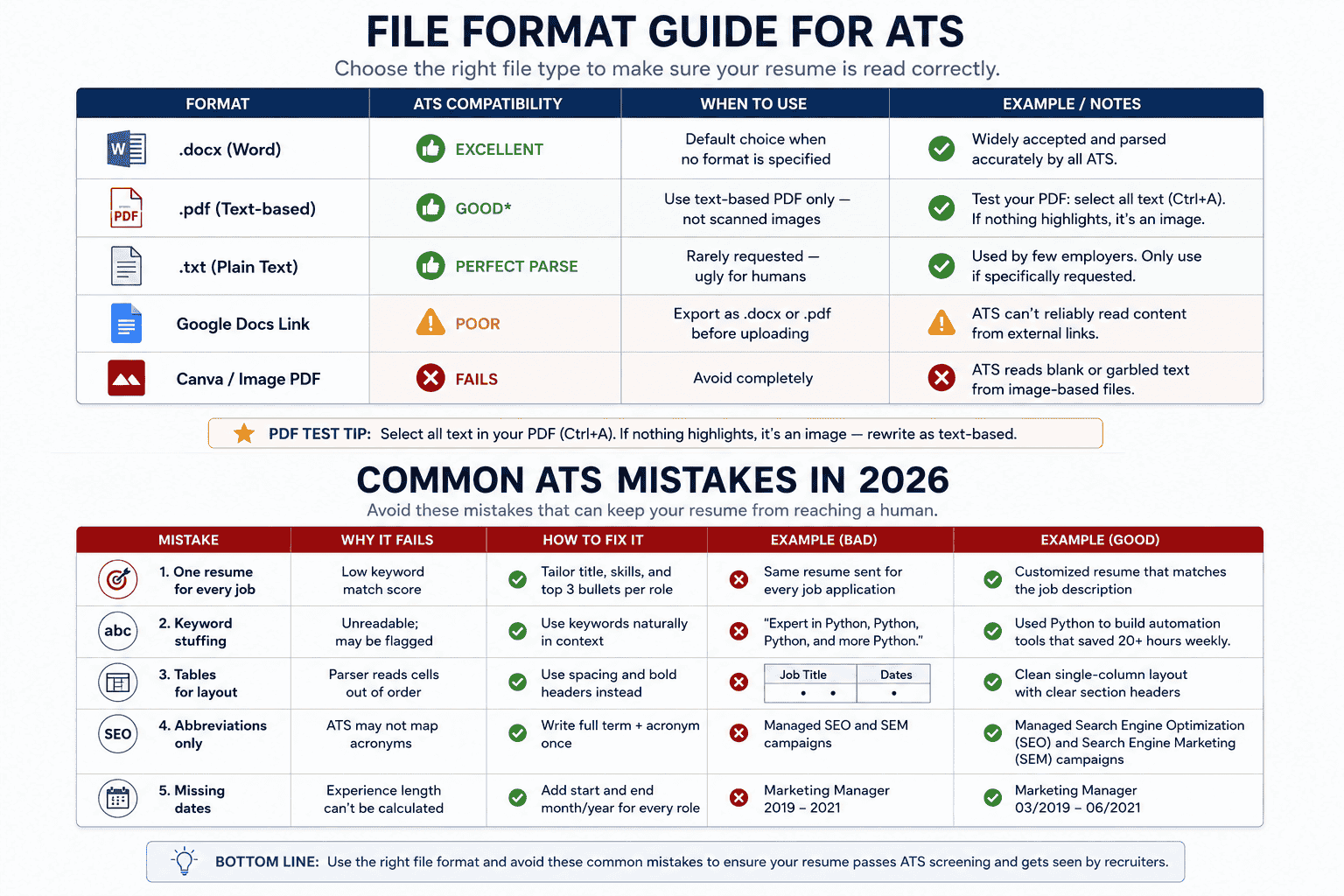
The wrong file type can break parsing before a single keyword is read. When in doubt, follow the application instructions exactly.
| Format | ATS compatibility | When to use |
|---|---|---|
| .docx (Word) | Excellent | Default choice when no format is specified |
| Good* | Use text-based PDF only — not scanned images | |
| .txt | Perfect parse | Rarely requested — ugly for humans |
| Google Docs link | Poor | Export as .docx or .pdf before uploading |
| Canva / image PDF | Fails | ATS reads blank or garbled text |
* Test your PDF: select all text (Ctrl+A). If nothing highlights, it's an image — rewrite as text-based.
Common ATS mistakes in 2026
| Mistake | Why it fails | Fix |
|---|---|---|
| One resume for every job | Low keyword match score | Tailor title, skills, and top 3 bullets per role |
| Keyword stuffing | Unreadable; may be flagged | Use keywords naturally in context |
| Tables for layout | Parser reads cells out of order | Use spacing and bold headers instead |
| Abbreviations only | ATS may not map acronyms | Write “Search Engine Optimization (SEO)” once |
| Missing dates | Experience length can't be calculated | Add start and end month/year for every role |
Pre-submission checklist
Run through this list before every application. It takes five minutes and can be the difference between silence and a callback.
- Professional title matches the job posting
- Skills section includes 8–12 hard skills from the job description
- Every bullet starts with a strong action verb and includes a metric where possible
- Single-column layout with standard section headers
- File is .docx or text-based .pdf (test with Ctrl+A)
- Contact information is in plain text at the top
- No headers, footers, tables, images, or skill bars
- Dates are consistent (MM/YYYY) for all roles
- Resume is 1 page (under 10 years exp) or 2 pages max (senior roles)
- Spell-check and grammar-check completed
- File named professionally: FirstName-LastName-Role.docx
Ready to apply?
Once your resume is ATS-ready, search roles that match your updated skills and title.
Browse open jobs